China Best Smart Hexagon Lights How to Control with Alexa?

Time:2026-09-28 Author:Liam
0%

Hexagon light panels can turn a blank wall into a colorful feature, but Alexa control depends on more than the shape of the lights. The panels need a compatible Wi-Fi controller, and their manufacturer must support Alexa directly or through a skill. Parks Associates’ 2024 consumer research puts smart-home-device ownership at roughly 45% of U.S. internet households, showing why clear setup guidance matters. Still, that figure does not mean every product works with every assistant.

Amazon’s former devices chief Dave Limp captured Alexa’s wider ambition with the phrase “Alexa everywhere.” That is a useful idea, not a guarantee of compatibility. To learn how to control smart hexagon lights with alexa, check the exact model, install its manufacturer app, link the required Alexa skill, and ask Alexa to discover devices. If discovery fails, confirm both apps use the same account and that the controller is online. Small details matter.

Once paired, try a simple command: “Alexa, turn on the hexagon lights.” You can also assign the panels to a room, adjust supported colors, or create a routine for a chosen time. Some models expose only basic power controls. Others offer richer color settings. The setup can be fiddly. Check the product’s official compatibility page before buying, and treat third-party instructions as secondary. I would not assume that “smart” automatically means Alexa-ready.
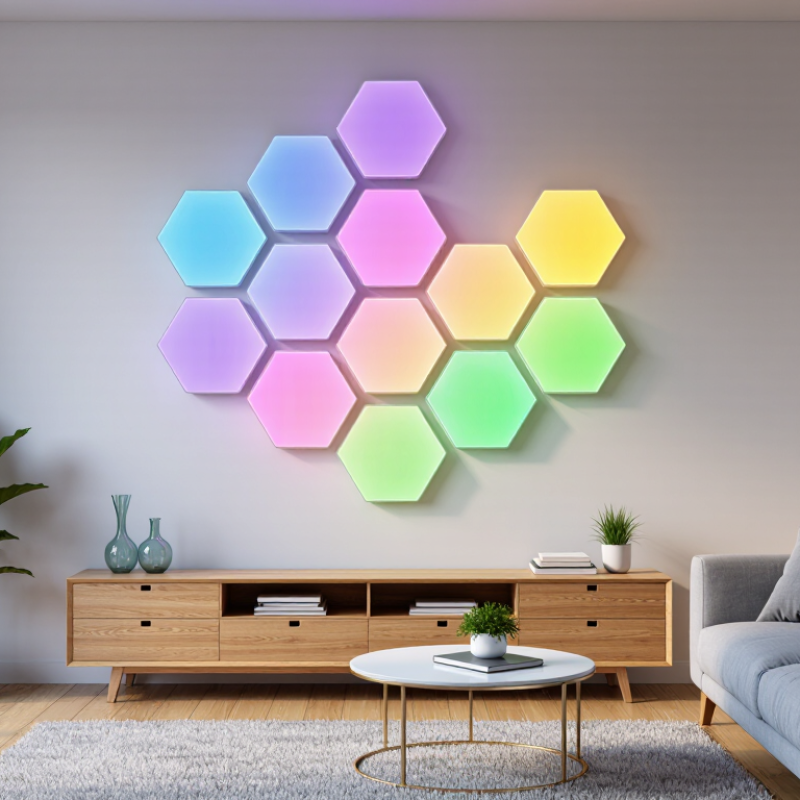
China Best Smart Hexagon Lights How to Control with Alexa?

What Smart Hexagon Lights Are and How They Work

Smart hexagon lights are modular LED panels shaped like six-sided tiles. Connect several panels to form a wall pattern, then use a controller to adjust color, brightness, or animated effects. Inside each panel, LEDs produce the light; the controller coordinates settings across the connected set. A companion app usually handles setup and scenes, while Wi-Fi or another wireless connection enables remote control. Compatible voice assistants can change basic settings by spoken command.

The shape is more than decoration. Panels can create a soft outline behind a desk, or a brighter accent above a gaming area. Still, a wall needs careful measuring: uneven spacing can make the pattern look accidental. Setup can be fiddly. Check whether the kit supports the wireless standard and voice-assistant features you already use; not every system offers the same controls. The U.S. Department of Energy’s Energy Saver guidance reports that LED lighting uses at least 75% less energy and can last up to 25 times longer than incandescent lighting. That comparison describes LED technology broadly, not a guarantee for every decorative panel. Real performance depends on product quality, heat management, and daily use.

How to Choose the Best Smart Hexagon Lights from China

Choosing the best smart hexagon lights from China starts with the room, not the advertised effects. Measure the wall and sketch the panel layout before comparing prices. Check how many connectors come in the kit, whether panels can expand, and how the power cable reaches an outlet. A small sample can reveal uneven color, loose joints, or visible gaps that product photos hide. Small details matter.

For Alexa control, confirm the exact connection method. Some sets link through an app; others require a hub or support only basic voice commands. Ask whether Alexa can change brightness, colors, and saved scenes, then check the Wi-Fi requirements. Many models use 2.4 GHz networks, but do not assume every setup is the same. Test before ordering.

Look beyond brightness claims. Review color consistency, dimming at low levels, heat management, warranty terms, and replacement-panel availability. Request clear product specifications and relevant safety documents, and compare them with the sample you receive. Supplier photos are useful, but they are not a quality test. A sample costs time and money, yet skipping it can be the more expensive choice. Even careful checks cannot guarantee flawless installation; wall texture and alignment still matter.

What You Need to Connect Hexagon Lights to Alexa

To connect hexagon lights to a voice assistant, check the controller’s specifications before buying. It must explicitly support the assistant, either through a compatible app, a cloud skill, or Matter. You will also need the lights, their controller, a phone, the manufacturer’s setup app, and a stable home internet connection. Many controllers require 2.4 GHz Wi-Fi, even when your phone uses 5 GHz. Check the manual; compatibility is not universal. Keep the controller near the router during pairing, and have your Wi-Fi name and password ready.

A small detail, but it can save a frustrating reset.

IDC’s Worldwide Quarterly Smart Home Device Tracker projected global smart-home device shipments would reach 1.1 billion units by 2027, reflecting a growing connected-home ecosystem. That growth does not mean every light works with every assistant. During setup, connect the lights in their own app first, then enable the relevant integration in your voice assistant’s app and discover devices. Give each panel a clear name, such as “hallway hexagons,” and test a simple on-and-off command.

If discovery fails, confirm both apps use the same account, check network settings, and restart the controller. Setup instructions can be vague. I would verify the exact model’s support page before assuming a reset will fix it.

How to Set Up Hexagon Lights with Alexa Step by Step

Hexagon lights need more than a striking wall layout; they need a stable network connection and Alexa-compatible controls. Grand View Research’s 2024 smart home market report valued the global market at about $127.8 billion, reflecting growing interest in connected home devices. Check the light kit’s manual before installation: some models require 2.4 GHz Wi-Fi, and the control method can vary. Connect the panels and power supply as instructed, then use the lighting system’s app to add the lights and test a color change.

To link the lights, open the Alexa app and look for the relevant skill under “Skills & Games.” Enable it, sign in to the same account used in the lighting app, then ask Alexa to discover devices. When the lights appear, assign them to a room, such as “living room.” Try a simple command: “Alexa, turn on the living room lights.” If discovery fails, check the Wi-Fi band, account permissions, and whether both apps show the lights online. One small setup detail can cause a lot of head-scratching.

Tips: Keep the controller near the router during pairing. Name the group something easy to say. If color commands fail, test them in the lighting app first; voice control may not expose every effect.

How to Set Up Hexagon Lights with Alexa: Step-by-Step

Estimated time for each setup stage. Actual setup time varies by light model, Wi-Fi network, and app version.

Prepare the lights and their app, connect them to Wi-Fi as directed in the product instructions, then link the compatible smart-home service in the Alexa app and discover devices. Finish by testing a voice command. Use a 2.4 GHz network if your light’s instructions require it.

How to Control Light Colors, Brightness, and Scenes with Alexa

Smart hexagon lights work best when voice control is set up around simple, repeatable commands. Pair the panels with a compatible hub or Wi-Fi connection, then link the voice assistant through its app. Exact steps vary by model and region, so check the maker’s instructions before pairing. Keep the phone and lights on the same network during setup. Small detail, big difference.

For colors, try commands such as “set the panels to warm white” or “change them to blue.” Brightness commands are useful for real tasks: lower the glow for a film, or raise it while reading. To create a scene, arrange the panels in the lighting app, choose each segment’s color and brightness, and save the preset as “Evening.” Then ask the assistant to activate that scene. Test each scene. Some systems treat a saved scene as one command; others need more setup.

The International Energy Agency reports that lighting accounts for about 15% of global electricity use and roughly 5% of global greenhouse-gas emissions. That figure covers lighting broadly, not decorative hexagon panels alone. Voice control cannot guarantee lower energy use, but dimming panels when full brightness is unnecessary is a practical habit. One limitation remains: spoken color names may look different across apps, and microphone placement can affect recognition. Try commands from the usual seat, not just beside the router.

China Best Smart Hexagon Lights How to Control with Alexa? - How to Control Light Colors, Brightness, and Scenes with Alexa
Control options depend on the light kit’s Alexa compatibility and the features supported by its companion app. Add and configure the lights in the required app before linking them with Alexa.
Control task What to set up Example Alexa request What to expect
Turn the lights on or off Link the compatible lighting service and discover the lights. Assign a simple device name, such as “Hexagon Lights.” “Alexa, turn on Hexagon Lights.”
“Alexa, turn off Hexagon Lights.”
Alexa can switch the lights on or off when the device is online and correctly linked.
Change color The light kit must expose color control to Alexa. Color names and available effects vary by product. “Alexa, set Hexagon Lights to blue.”
“Alexa, change Hexagon Lights to red.”
A supported color may be selected. Dynamic effects or individually colored panels may require the companion app.
Adjust brightness Brightness control must be supported and available to Alexa for the connected light. “Alexa, set Hexagon Lights to 50%.”
“Alexa, dim Hexagon Lights.”
Percentage requests set a target brightness when supported; “dim” and “brighten” make relative adjustments.
Set a white-light tone Tunable white control is needed. Some color lights support color changes but do not offer adjustable white color temperature through Alexa. “Alexa, set Hexagon Lights to warm white.” The result depends on whether the light exposes white-tone or color-temperature controls to Alexa.
Run a saved scene Create a scene in the lighting app or Alexa app, then confirm it appears as a scene or controllable device in Alexa. “Alexa, turn on Movie Time.” The saved scene runs if it is available to Alexa. Scene names and supported actions depend on the integration.
Create a voice-triggered routine In the Alexa app, create a routine with a voice phrase as the trigger and supported light actions as the response. Create the phrase “Start gaming,” then say: “Alexa, start gaming.” A routine can combine supported actions, such as switching on the lights and setting a color or brightness.
Control lights by room or group Place the lights in an Alexa group, such as “Living Room,” and use a distinct device name to avoid ambiguity. “Alexa, turn off the Living Room lights.” Alexa controls devices assigned to that group; avoid duplicate names that could cause the wrong device to respond.
Troubleshoot missing controls Check Wi-Fi and power, confirm the lighting app works, verify the account link, and run device discovery again. “Alexa, discover devices.” Rediscovery may help Alexa find a device, but it cannot add features that the light or its integration does not support.
Note: Alexa wording is illustrative. Available colors, brightness adjustments, white tones, scenes, and per-panel controls depend on the specific light kit, its software, and the connected Alexa integration.

FAQS

What do I need before connecting hexagon lights to a voice assistant?

Check that the controller supports your assistant through an app, cloud skill, or Matter. You’ll need the lights, controller, phone, setup app, and stable internet. Keep your Wi-Fi details handy.

Do hexagon lights work with every voice assistant?

No. Compatibility depends on the exact controller and model. Check its manual or support page before buying. Assumptions can waste time.

Which Wi-Fi band may the controller require?

Many controllers require 2.4 GHz Wi-Fi, even if your phone uses 5 GHz. Check the manual for the exact requirement.

How should I set up the lights?

Connect the panels and power supply as instructed. Add the lights in their own app, then test a color change. Keep the controller near the router during pairing.

How do I link the lights to a voice assistant?

Enable the compatible integration in the assistant’s app. Sign in with the same account used in the lighting app, then discover devices. Assign the lights to a room.

What should I check if the lights are not discovered?

Confirm both apps use the same account and show the lights online. Check the Wi-Fi band and account permissions, then restart the controller if needed. Resets are not always the answer.

What should I name the lights or group?

Choose a clear, easy-to-say name, such as “hallway hexagons” or “living room lights.” Simple names help voice commands land correctly.

Why might color commands fail when basic commands work?

Test the color change in the lighting app first. Voice control may not support every effect. That limitation is easy to overlook.

Conclusion

Smart hexagon lights are modular lighting panels that connect to create geometric designs on a wall. Depending on their controller and wireless connection, they can respond to voice commands, change colors, adjust brightness, and display lighting scenes. When choosing a set from China, consider panel quality, connection options, installation requirements, app support, and whether the product is compatible with Alexa. You will also need a stable Wi-Fi connection, the light kit’s controller and companion app, and an Alexa-enabled device.

To set up the lights, install the panels and controller according to the instructions, connect them to the app, and link the compatible lighting service in the Alexa app. Once the setup is complete, discover the lights and assign them an easy-to-say name. Learning how to control smart hexagon lights with alexa lets you use voice commands to switch them on or off, choose colors, set brightness levels, and activate available scenes for different activities or moods.

Liam

Liam

Liam is a dedicated marketing professional with a profound expertise in the industry, where he excels at highlighting the unique advantages of our core products. With a keen understanding of market trends and consumer needs, Liam frequently updates our company’s professional blog, providing......